01
Three dashboards. Every angle.
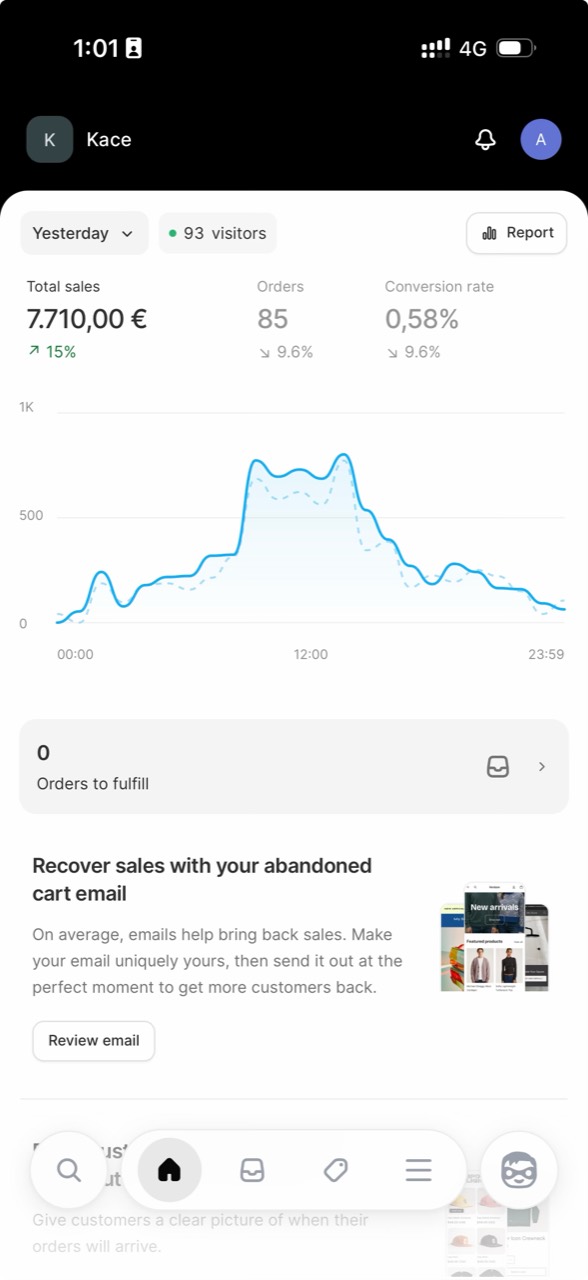
Give every scene the right dashboard, with all three included in your membership. Build fictional screens for your videos, skits, and demos.
Dashboard simulations for creators
Create the dashboard your content needs on your phone. Customize fictional balances, sales, names, and visitor activity, then capture the screen for your next video, skit, or demo.
Every dashboard. One membership.
Fictional screens for creative use. No real accounts or transactions.
The whole toolkit
From the first number to the final take.
Make every detail part of your story.
Give every scene the right dashboard, with all three included in your membership. Build fictional screens for your videos, skits, and demos.
Set the sample balance. Shape the sales graph. Choose the orders and visitor activity. Make the details fit the story you’re telling.
Install on your iPhone or Android phone, open from your Home Screen, and capture the scene with your phone’s screenshot or screen recorder.
Made for your next post
A punchline, a walkthrough, a close-up.
You bring the idea. We bring the dashboard.
Community voices
Selected feedback from
our Telegram community.
One membership. Every dashboard.
Full access to every phone app, with future updates included.
Go monthly, settle in for a year, or make it lifetime.
Cancel anytime.
Auto-renews. Cancel anytime.
$8.25/month, billed yearly. Save 41%.
Auto-renews. Cancel anytime.
Pay once. Never again.
One payment. No renewal.
Secure checkout with Stripe.
No. LarpTools creates simulated screens for content. The balances, sales, and activity you set are fictional. The dashboards don’t connect to real accounts or move money.
Every plan includes all three dashboard simulators. Customize them for videos, skits, social posts, demos, and screen props. Future dashboards and updates are included too.
Choose a plan, complete checkout, and sign in on your iPhone or Android phone. Pick a dashboard and follow its Home Screen setup guide. Open its icon, set up your fictional scene, and capture it with your phone’s screenshot or screen recorder.
Yes. Personalize sample balances and display names, or set up store sales, orders, graphs, and a changing visitor range in the commerce dashboard. Your setup stays saved locally on the device where you create it.
By card through Stripe. Monthly and yearly plans auto-renew; lifetime is a single payment.
Yes, from your account. You keep access until your paid period ends.
Yes. Pay once for current and future panels, with no renewal.
Every dashboard. Ready for whatever you make next.